
#17
Apr 11, 2007

HABTM Checkboxes

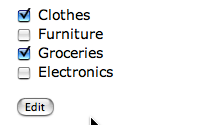
It is often asked: how do I create a list of checkboxes for managing a HABTM association? Ask no more because this episode will show you how to do exactly that.
Tags: views forms
Download (30.6 MB, 6:54)
alternative download for iPod & Apple TV (13.8 MB, 6:54)
<!-- products/_form.rhtml -->
<% for category in Category.find(:all) %>
<div>
  <%= check_box_tag "product[category_ids][]", category.id, @product.categories.include?(category) %>
  <%= category.name %>
</div>
<% end %>
# products_controller.rb
def update
  params[:product][:category_ids] ||= []
  #...
end

RSS Feed for Episode Comments 72 comments

1. Ben Apr 24, 2007 at 22:40

I used this screencast to create a checkbox list for a posts/categories relationship and found that in post/update where you have "params[:post][:category_ids] ||= []" that I had to add a "rescue nil" at the end up that line to make tests happy. Think I did the right thing?


2. James H Apr 26, 2007 at 20:33

@ben: Definitely. You're probably manipulating a page that _only_ has check boxes. Since a form of only check boxes (with none selected) won't submit anything for that param you have to handle the 'nil' exception.

It should also be noted that has_many relationships _do_ have a #relationship_ids= method, but has_many :through relationships don't.


3. James Apr 27, 2007 at 08:21

A "gotcha" of this method of HABTM check box handling is that you lose some UI functionality. Because each of your check boxes will have NAME and VALUE like "model[habtm_relationship_ids][]", you can't pair them with a label in a manner that clicking on said label selects the checkbox.


4. Ian Apr 28, 2007 at 11:18

Am I right in saying this isn't quite as straightforward when we try to implement with a has_many :through association?

I can get my checkboxes displaying (and checking) properly, but struggle to update - I think it's something to do with the ids being passed being those of the 'join' table.

Anyone cracked this, or am I going about it the wrong way?


5. Ryan Bates Apr 29, 2007 at 21:39

@Ian,

Correct, it doesn't work the same way with has_many :through because this association doesn't have the "category_ids=" setter method. You need to create this on your own. See this thread for details:

http://railsforum.com/viewtopic.php?id=803


6. jjk2 Apr 30, 2007 at 13:47

one thing im still not obvious to me is the

product[category_ids][] u wrote in the view.

does this mean product.category_ids => []

what does category_ids method do by itself only without the [].


7. Ryan Bates Apr 30, 2007 at 15:42

Yeah, that's a little confusing. The "category_ids" method accepts an array of ids, so:

product.category_ids = [1, 2, 3]

Will set categories with ids 1, 2 and 3 to that product. Normally in Rails forms you put the name of the attribute in square brackets and use that as the name of the field:

product[category_ids]

This way Rails knows it's an attribute of product. But if you just did this, it would take only one check box value and set that:

product.category_ids = 1

But here the category_ids method expects an array, so you need those empty square brackets in the name of the check box. Rails will then gather up all values with this same name and place them in an array. This is what the empty square brackets do:

product[category_ids][]

I hope that made some sense.


8. jjk2 May 04, 2007 at 01:36

Ah, yes. makes so much sense.

btw, how are you able to display the length running time for your .mov files? have you considered, displaying a snapshot of a random frame from a .mov file as a thumbnail? im just curious as how you are able to access the metadata of .mov files such as length, title, and etc.


9. Ryan Bates May 04, 2007 at 09:03

@jjk2, no magic going on here. I'm just typing in that information manually. I'm sure there's some smart ways to have Ruby fetch the movie metadata, but the movies are on a separate server so that makes things considerably more difficult. If I do automate it, I will probably fetch the metadata on my local which has acccess to everything then have it automatically upload that info. So far I'm okay with typing it in manually though.

As for the thumbnail image, I'm not sure how useful it will be since half of the time it will display code which you can't read. I'll consider doing it if I get more requests though.

Thanks for the suggestions.


10. jjk2 May 04, 2007 at 13:11

ah, i just realized it as i hit teh click...a thumbnail wouldn't do much for screencasts hahaha.

yea you would have to use rmovie, ffmpeg....to do what i described. it can be a quite a load on the server cpus.

keep up the good work!


11. Schlick May 05, 2007 at 19:23

Fantastic! I stumbled upon your railcast site whilst trying to work out how to handle HABTM checkboxes and bam, there's the solution right there! I found other stuff on the net but they were confusing or not quite what I wanted. Your railcast on this topic was exactly the solution I was looking for plus it was quick, easy and straight to the point. I'm very impressed. I'll be subscribing in iTunes and I'll be looking back over your previous railcasts now. Many thank!!


12. Sam Aaron May 07, 2007 at 11:06

Hey Ryan, these screencasts are really nice, you're doing some really good work :-)

It seems that there's a bit of confusion about the differences between HABTM and has_many :through, particularly with these checkboxes. Maybe you might spend a bit of time explaining the differences, and/or running through the process of implementing these category checkboxes with a has_many :through relationship.

Thanks for the effort you're putting into this :-)


13. Ryan Bates May 07, 2007 at 15:03

@Sam, the difference is subtle but very important. I'll try to dedicate a screencast to it in the future.

In short, normally you will have a more robust interface for a has_many :through association because the join model may likely have more fields than the two foreign keys. So you may need a checkbox and a text field for example. Usually this problem is solved with AJAX so it's not just simple checkboxes. I'll try to explain more in a future episode. Thanks for the suggestion


14. Federico Brubacher May 15, 2007 at 20:25

Hi Ryan ! Thanks for the great site. I loved this tutorial and found it helpful but couldn't make it work when I generate the scaffold using "scaffold resource" as for making it work RESTfuly (as accepting requests in various formats)


15. Ryan Bates May 15, 2007 at 21:09

Hmm, it should work fine with a RESTful design because you're just editing a model's attributes like normal. Unless you have a has_many :through association instead of has_and_belongs_to_many, in that case you would have to create your own "*_ids" method.

Can you be more specific on what isn't working?


16. Drew May 20, 2007 at 07:29

Okay, nothing else worked for me except this explanation. Even the Rails wiki was confusing. Thanks!!


17. Jeremy Roush Jun 21, 2007 at 14:37

Thanks a bunch for this. Very helpful and clear.


18. Scott Jul 09, 2007 at 22:34

Great tutorial Ryan! This one really helped me out. Keep up the high quality work.


19. Klian Jul 25, 2007 at 02:56

Im getting some problems...

Ive followed your tutorial step by step and the application tries to insert the 'id' field in categories_posts:

Mysql::Error: Duplicate entry '2' for key 1: INSERT INTO categories_posts (`post_id`, `id`, `category_id`) VALUES (19, 2, 2)

and it should be:
INSERT INTO categories_posts (`post_id`,`category_id`) VALUES (19,2)

Any help ?

Thanks


20. Klian Jul 25, 2007 at 03:21

Ok, was my fault...

The database categories_posts shouldnt have an id field :)


21. Alastair Moore Aug 16, 2007 at 07:30

@James:

what is wrong with doing

<label><%= check_box_tag "product[category_ids][]", category.id, @product.categories.include?(category) %> some label</label>

this pairs a label with the checkbox.


22. mike Oct 14, 2007 at 19:20

Why is it that all of the checkbox info on the net is for updating items that already exist. How can i do this for a new entry.


23. Olli Dec 18, 2007 at 02:59

Here is a little fix for keeping the generated checkbox code standards complain :
<%= check_box_tag "product[category_ids][]",category.id, @product.categories.include?(category),{ :id => "product_category_ids_"+ category.id.to_s} %>

The example from Ryan puts "[]" into the id field of the input tag and this is not allowed according to the w3 ;)


24. Dom Jan 02, 2008 at 21:43

Damn there's some spam in here... I think you need to implement a CAPTCHA.

Anyways - quick question - how can I use this with a self-referencing model?

For example, I have an Article model which I want to have Related Articles. Any pointers much appreciated.


25. Francois Feb 08, 2008 at 12:45

Ryan,
 you just saved me a bunch of time in having to figure this out on my own. Thank you!!


26. Dan Feb 21, 2008 at 11:37

I'm using the technique you presented, but with a :has many :through. I've added the setter method to my model, and its editing fine. But when I add a new, I'm getting a "You cannot call create unless the parent is saved" error.

How do I get my parent object created before the children?


27. Neil Feb 22, 2008 at 11:03

@Dan - I'm getting the same problem. I'll post back if I find a fix. Using a HMT really mixes things up!


28. eddie Feb 25, 2008 at 03:16

Any idea how you'd manage validation for a check box like this, or more specifically, how check boxes could be highlighted if none are ticked?

If you put something like:
validates_presence_of :category_ids
in the products model ( to ensure that each product had at least one category box ticked) it's possible to display error messages when a form is submitted without any of the category boxes ticked, but how would you *highlight* the offending tickboxess?


29. John Mar 13, 2008 at 04:20

I've just tried Alastair Moore's suggestion for binding labels to the HABTM checkboxes and it works perfectly. Thanks for a great Railscast, and thanks to Alastair.


30. ToBeAnnounced Mar 17, 2008 at 15:38

I'm dealing with the same MySQL database error as Klian, above. My join table only has the two _id columns, though.


31. Marcus Mar 27, 2008 at 10:41

Thanks for the screencast! Extremely helpful. I spent an extra hour goofing around because I had used attr_accessible in my model, and I needed to add category_ids to the list of accessible attributes so that update_attributes would work. Hope my pain helps somebody else.


32. Lars Mar 28, 2008 at 17:36

Ryan, how would you go about adapting this to select boxes rather than checkboxes? I have a habtm relationship between "stores" and "products", where each store can carry up to 10 'products', but I would like to display the 'products' in select rather than as checkboxes (as there are > 100 of them).

So, visualize looking at a 'store' page where you see 10 select boxes, all populated from the 'products' table.

I've been trying collection select and friends, but can't seem to get everything to play nicely together.


33. Frederic Apr 20, 2008 at 08:50

@Marcus - Thanx man, this info saved me quite a lot of time, thx!

@Ryan - keep on going!


34. mike Apr 21, 2008 at 11:44

How would one adapt this for creating new "products" and not just adding because it does not seem to work.


35. Allen Feng Apr 23, 2008 at 00:36

I have no idea why everyone else gets this to work. I followed it step by step by I couldn't. Are you supposed to create three tables: Categories, Products, and Categories_products? And I tried something like product:references when generating a scaffold and it produces product_id instead of product_ids...the railscast should provide more information on this.


36. Allen Feng Apr 23, 2008 at 05:37

holy donkey, finally get it to work but with the additional following:

1. delete the id field in categories_products table
2. add this: @expense.tags = Tag.find(params[:tag_ids]) if params[:tag_ids] to update action

I don't know why I need step 2 to make it work...I thought the update_attribute will do, but it didn't. Can someone tell me why?


37. Carl Hamrin Apr 23, 2008 at 19:04

In this episode you clearly showed how to handle checkboxes with HMABTM relations.
But you said in the comments that if you have many_to_many relations you have to create your own logic. Would you please expand on that in a future episode. I am an experienced software engineer up to now working in perl and php, but a newbee to Ruby and I greatly appreciate these podcasts. I have looked through the archive of episodes but don't see any response addressing my issue.

Carl


38. Jim May 16, 2008 at 12:00

Ryan, could you show the view that is calling this template?

The scaffold generator in Rails 2.0 may be setting things up differently, but I'd like to see your render :partial call to be sure.


39. Taylor luk May 22, 2008 at 02:42

For those who has troubled using has_many :through needs custom setter methods or have problem with creating new records..

i find the solution to make tag_ids= method to work with new records..

http://pastie.org/201438


40. Jeffrey Lee Jun 24, 2008 at 08:48

When I apply the code above to my application everything works on create and update but the update (edit) page displays the checkbox sets one time for every item checked.

So if I have three items checked when I edit a record then I have three sets of checkboxes displayed. Making a change to any one and saving works but I do not know how to stop it from looping through checked items and messing up the display.

<div class="agencytype">
<p>
<%= label :agencytype_form, :agencytype, "Agency Type" %>
<% for agencytype in Agencytype.find(:all) %>
<div>
<%= check_box_tag "profile[agencytype_ids][]", agencytype.id, @profile.agencytypes.include?(agencytype) %>
<%= agencytype.name %>
</div>
<% end %>
</p>
</div>


41. Marco Jul 24, 2008 at 07:24


Hi Ryan,

I did your example and everything is running so satisfactory: the table this categoreis_products storing exactly what I wanted. but the question is:
How do I get that in view of products I can redeem all the categories related to it?
maybe, you could show me a piece of code with this implementation!

ATT

Marco


42. Brad Gessler Jul 24, 2008 at 13:06

I would recommend putting the line

params[:product][:category_ids] ||= []

in a before filter. So..

# Top of the controller...
before_filter :initialize_check_boxes, :only => [:create, :update]

# Bottom of the controller as a protected method
def initialize_check_boxes
  params[:product][:category_ids] ||= []
end


43. Simon Aug 27, 2008 at 22:42

Thank you!


44. Ali Nov 17, 2008 at 10:43

Thank you


45. David Nov 19, 2008 at 10:34

I tried for a couple days to make this work with the RESTful authentication. I wanted to add 'roles' to user accounts.

so I have a User class and a Role class. both are HABTM with a proper join table.

I'm not sure exactly what "RESTful authentication" is doing differently, hiding methods or something, but I had to specifically add ":role_ids" in where you specify attr_accessible in the User class.

Analagising this to the example, you'd have to specifically put

attr_accessible :catagory_ids
in the Product class

I'm not sure why this is, but I hope I can save someone some frusteration!


46. Nick Hoffman Nov 27, 2008 at 15:09

Great tutorial, Ryan. Many thanks. I used Olli's suggestion (comment #23) to make the checkboxes' IDs W3C-compliant.

Keep up the good work!
-Nick


47. joshua Dec 09, 2008 at 09:44

i have a problem related with this, i can insert data for the many-to-many relationship but it's no deleting anything, what could be the problem?


48. Fluffy Jan 01, 2009 at 01:30

I tried out the code,

It works great!

But there is one problem.

I am in the middle of making a Scavenger Hunt app, and there is teams and tasks and they have a HABTM relationship to each other.

I did everything like you said/showed but when I try to add a task to one of the teams when that task is already on another team then it won't work.

It has something to do with the ID and it not being unique.

It's passing the same number for the ID in the joining table and for the 'task_id' column in it, so it gets an non-unique ID when another team completes that task.

Is there like a way to make it auto-increment the ID column

PLEASE HELP!!! I'm new to this and it makes no sense coming from a PHP background.

Thank You


49. David Jan 12, 2009 at 23:21

@Fluffy
Check to make sure the join table has :id => false so that your join table does not have a primary id column.


50. laura k Jan 21, 2009 at 09:54

Alas, this seems to be exactly what I need but I can't watch it or download it because the server keeps dropping the connection. Is this just on my end? I'm baffled, and am desperate for HABTM enlightenment.


51. John Jan 25, 2009 at 18:17

Hey Ryan,

Thanks again for the great screen casts, but i had question regarding this one. I understand you establish the habtm relationship between the two models, but i'm not sure how this is being stored in the db.

Everything i read says you need to do something like this product.category.create...

i notice the create action in your controller is the standard create as well as the update, so i'm not sure if this is being done in the Product model?

Thanks for the help.

John


52. Paddy Feb 02, 2009 at 07:01

Hello Ryan,

As usual a great screen cast. If i wanted to create a new category and wanted to assign that category to the product, can you please do let me know how to do that?

Thank you!

Pads


53. Erick Feb 17, 2009 at 10:54

Hello Ryan,

Great screen cast tutorials.

I am attempting to recreate your #17 screen cast under Rails 2.2 and am having problems. Is it possible that you have the code for the "Controllers through DB" zipped somewhere were your audience could download into a learning rails project and test? I think that I am missing too many "background" rails set-ups for my attempt to work. One of the problems I am getting is a reversal of the browser_os join in the rails application I am trying to build. Is this because I created the scaffolds in reverse order? [Even typing that last statement it looks dumb -- but what do I know?]

Thanks. I hope that you are still monitoring/responding to this railscast.


54. Erick Feb 18, 2009 at 18:06

Ryan, disregard my earlier posting. I found answers to two of my problems (1. reversal of names -- caused by spelling and length issues, correct by adding :join_table => xxx to assignments) and (2. found that rails had added the timestamps to the join table which was causing other problems.)

Thanks, and sorry for adding a non-issue to the discussion.


55. sacredceltic Feb 23, 2009 at 16:45

Hi

the view works perfect for me, but the controller method 'update' doesn't. How does that link with the update of the product ?
I get "primary key must be unique" errors on my link table everytime I check boxes and update...


56. Elliot Nelson Mar 12, 2009 at 13:22

If you can't nest the check boxes within your labels (for example, you need some special styling on the label), you can still link them easily using the dom_id helper.

Example based on the snippet at top of page:

http://gist.github.com/78264


57. Sven Fuchs Mar 22, 2009 at 14:22

Instead of the somewhat clunky before_filter params[:product][:category_ids] ||= [] one can get away with a hidden field named product[category_ids][] that has an empty value plus then rejecting blank? category_ids in the model in #attributes=


58. kunal Apr 11, 2009 at 13:12

First off you are really help people adopt rails.
Execellent work, really. thanks !

when you do script/console and modified product,
1) why didn't you have to do a product.save to apply the updates to the database. Looks like it did that automatically. why or rather how ?

2) i see you do model.build how is it different from model.save or model.new ?


59. Chris Gunther Apr 25, 2009 at 09:23

Hey everyone. I know this is an old screencast, but I wanted to add a little something to it.

My implementation had about 50 checkboxes, which by Ryan's method, caused about 50 database hits (one per checkbox) to see if it should be selected. I refactored this a bit so it only hits the database once and gets the entire list of selected checkboxes, then references that variable as opposed to the database.

Here's my slightly modified version:
http://pastie.org/458065

Chris


60. Edward Kenworthy Jun 09, 2009 at 05:34

@Lars

Try this to completely replace the code given for products/_form.rhtml

<%= select_tag "product[category_ids][]", options_from_collection_for_select(Category.find(:all), "id", "name"), :multiple => true %>

I haven't however worked out how to show items as already selected based on the categories already associated witht the product.


61. Ben Jun 10, 2009 at 20:52

Hi, I am new to RoR and I am very close to getting this to work, but I am possibly missing something that you covered outside of the screencast. I can view to the selected checkboxes (they are selected appropriately) but I cannot update them (in any case).

Could you please post this railscast's code on your GIT repo? I only saw code for the later episodes.


62. Victor Jun 27, 2009 at 12:07

Just to echo what others have said, after multiple searches across the web this solved my check_box problem in five minutes. Thanks so much!


63. Horace Ho Jul 12, 2009 at 07:40

Project has many Events,
Events HABTM Users,
Users HABTM Events.

In the Project view, I can successfully show the checkbox, but the checkbox name is definitely wrong and can't pass back correct params to update the Project.

In the console, I can confirm the models are set up correctly:

>> proj = Project.find(:first)
>> proj.events[0].user_ids
=> []
>> proj.events[0].user_ids = [1,2]
=> [1, 2]

however, how can I name the check_box_tag?

The following returns an unknown key: user_ids error when submit the form:

<%= check_box_tag "proj[event_ids][user_ids][]", user.id, event.users.include?(user) %>


64. Horace Ho Jul 12, 2009 at 10:50

Solution for #67: http://ho.race.hk/blog/?p=143


65. Robert Massaioli Sep 17, 2009 at 22:31

This cast really is very, very nicely done. I loved watching the HTML form return data being handled very nicely by the rails framework.

Nicely explained as well. The biggest magic was the "product[category_ids][]".


66. LP Sep 20, 2009 at 17:42

Add a validates_presence_of :name to the product model, and try updating a product with a blank name and modified checkbox values. It won't save the product, but it will have updated the habtm records.


67. Eraticus Oct 20, 2009 at 20:35

Just wondering...

Is it possible to have a text field associated with each checkbox? What if the form creates an entry in the join table, but also should set a property in the jointable/join object itself? As an example, there is a free form text field for notes on the choice made by marking the checkbox.


68. Marcello Dec 23, 2009 at 08:41

I need the same..
<< Is it possible to have a text field associated with each checkbox? What if the form creates an entry in the join table, but also should set a property in the jointable/join object itself? As an example, there is a free form text field for notes on the choice made by marking the checkbox.>>
Thank you


69. Fernando Kosh Jan 22, 2010 at 12:26

Hey man,

Very cool!

thank you for these good videos.


70. Chetan Feb 02, 2010 at 02:23

Hey Ryan,
 Big fan of your work! I was trying out the code, but ran into a bit of an issue.

 The join table is saving "null","null" as the product_id, category_id. When I have 2 categories selected, I have 2 rows in the join table, with "null","null".

I'm using Mysql 5, and exactly the code above.


71. Danny Feb 17, 2010 at 04:54

Anyone knowns how to validate the content of the checkbox? To ensure the user does not add unauthorized id? I can't find how to do that using validate_inclusion_of.


72. Louis Vuitton handbags Mar 09, 2010 at 19:19

railscasts.com/episodes/17-habtm-checkboxes

Add your comment:

(SKIP THIS ONE)

(required)

(not shown)


(use pastie or gist for code)

sponsored by:
if you want to help:
required:
Get Quicktime Player
Give Back to Open Source