
#18
Apr 13, 2007

Looping Through Flash

Displaying flash messages in the layout can be a pain at times. In this episode you will learn an easy way to display any kind of flash message by looping through the hash.
Tags: views
Download (6.3 MB, 1:44)
alternative download for iPod & Apple TV (2.7 MB, 1:44)
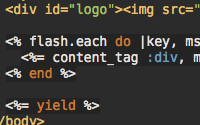
<!-- layouts/application.rhtml -->
<% flash.each do |key, msg| %>
  <%= content_tag :div, msg, :id => key %>
<% end %>

RSS Feed for Episode Comments -7 comments

1. Olek Poplavsky Jul 22, 2007 at 07:40

This is fine approach, but it will display errors mixed with warnings in no particular order, and that is not good in my opinion. I prefer messages sorted in order of decreasing severity: [:error, :warning, :notice, :message]

I have some code that does it, but I written it at the very beginning of studying ruby/rails, so I will not posit it here, it is not pretty ;)


2. Ryan Bates Jul 22, 2007 at 08:15

How about this: http://pastie.caboo.se/81153


3. meekish Jan 25, 2008 at 14:15

Here's a HAML version: http://pastie.textmate.org/143587


4. austin_web_developer Dec 08, 2008 at 06:42

Does anyone have the problem where the flash message stays on the page one reload more than it is supposed to?

So if you reload the page, the flash message is still there, but it goes away after a second reload.

Its a problem because if you carry out an action and you get an error, then do it again and get a success message, the previous message is displayed on the page at the same time as the current one.


5. Travis Roberts Dec 11, 2008 at 11:31

@austin_web_developer You can fix this by using flash.now[:notice] instead of flash[:notice]. I wrote a blog post explaining how the flash hash works: http://travisonrails.com/2008/08/17/Working-with-the-flash-hash"


6. Bob Smith Jan 28, 2010 at 21:39

Having trouble with flash.. with flash[:notice] or the method shown here, any use of flash causes a 'stack level too deep' error. Is there any way to clear the flash ? I assume this would clear the error.

Bob


7. Panyusha Feb 22, 2010 at 11:21

I like it. Thanks.


8. Emiliana Feb 26, 2010 at 13:18

A very good article, I will always come in.


9. Rex Mar 17, 2010 at 09:42

I'm new to Rails. Love the RailsCasts. Sometimes, even using the Flash.now, I get a one-line blank highlighted line on the next page, reached by using a Nav bar link_to function. The idea is that sometimes the user sees the error message and just bails out to another place in the program using the navigation bar function. The html source of the problem page reads:

<div id="notice"></div><div id="warning"></div>

On Safari on a Mac, this generates a single colored line for each division, containing no text.

I've only been able to eliminate this quirk by adding an "if flash[:error]" check before div & flash lines - obviously not using the cycling method described here and typing many more characters. Any tips would be appreciated.


10. MBT Tembea WMNS Apr 08, 2010 at 22:15

thanks for ur article!


11. free directory list Aug 11, 2010 at 22:16

Thanks for the help.


12. selma Aug 19, 2010 at 13:41

thanks admin


13. air jordan retro 13 for sale Aug 23, 2010 at 23:08

Thanks a lot for the awesome, handy and easy screencast! Now obviosly I would have to call ajax for every lib job, but umfortunately I wasn't able to achive this until now cause its tricky or probably not possible to call an action or a rjs file from outside the controller itself that would replace the corresponding div id.


14. louis vuitton shoes Aug 26, 2010 at 23:19

Thanks for sharing your article. I really enjoyed it. I put a link to my site to here so other people can read it. My readers have about the same interets


15. snow boots Aug 31, 2010 at 02:02

Is there any way to clear the flash ? I assume this would clear the error.

Add your comment:

(SKIP THIS ONE)

(required)

(not shown)


(use pastie or gist for code)

sponsored by:
if you want to help:
required:
Get Quicktime Player
Give Back to Open Source