
#16
Apr 09, 2007

Virtual Attributes

Keep your controllers clean and forms flexible by adding virtual attributes to your model. This very powerful technique allows you to create form fields which may not directly relate to the database.
Download (10.5 MB, 3:41)
alternative download for iPod & Apple TV (5.7 MB, 3:41)
<!-- users/new.rhtml -->
<%= f.text_field :full_name %>
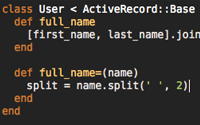
# models/user.rb
def full_name
  [first_name, last_name].join(' ')
end

def full_name=(name)
  split = name.split(' ', 2)
  self.first_name = split.first
  self.last_name = split.last
end

RSS Feed for Episode Comments 36 comments

1. Sander May 29, 2007 at 06:14

Very nice!

When the full_name has no spaces, the first_name and last_name will become equal! Is it possible to add an extra validation rule onto the virtual attribute?


2. Ryan Bates May 29, 2007 at 07:59

Yep, you can treat it just like a normal attribute and add a validation like this:

--
def validate
  validate.errors.add(:full_name, 'must have a space') unless full_name.include? ' '
end
--

However, the problem is the getter method may not represent exactly how the user typed it. So it's best to store the user submitted data in an instance variable so you can return it in the getter method when it's set.


3. Gary Jul 16, 2007 at 13:09

how easy would it be to add an attribute that all activerecord objects would have?


4. Ryan Bates Jul 16, 2007 at 14:58

If you put the methods in ActiveRecord::Base they will be available to all models. You can do this through a plugin which I show in this episode:

http://railscasts.com/episodes/33


5. Tom Oct 09, 2007 at 08:07

If you want to do this the other way around. Say fullname in database (just example) and you want to show first/last name. Do you add the get/set for first+lastname and merge them with a before save hook?


6. Ryan Bates Oct 09, 2007 at 10:05

@Tom, yep, that's how I would do it.


7. Bjorn Oct 16, 2007 at 02:39

Is there some way of having (virtual) attributes passed from the view without defining a method in the model? I.e. I have several virtual attributes that the user enters into a form in the view, and then in the model I use a method to query a web service before saving the results from that web service to the actual db (i.e. method is called with :before_save).


8. Bjorn Oct 16, 2007 at 04:20

Ok I'm a newb but I'm a persistent one, so I found out after a while. Here it is, in case someone else stumbles on it. Just do:

attr_acessible :some_virtual_attribute
attr_accessor :some_virtual_attribute

etc

which I guess makes it seem like a regular instance variable, which can be accessed plainly as 'some_virtual_attribute' or with self.some_virtual_attribute.


9. pimpmaster Dec 10, 2007 at 08:30

How could I get this to work with middle names?

IOW, give the user the option to enter either an initial, or a full middle name.

My guess is that some Regex might be needed, but perhaps there is a cleaner way


10. tom n Dec 19, 2007 at 09:59

Intersting that you didn't show the controller at all. I guess when you use form_for the parameters are automatically associated with the model object, not just named after the model object?

If so, why would the controller still do something like @user.update_attributes(:parmams) ? (or do you avoid that step somehow?)

Does the virtual attribute change the params? I'm confused about how this is working.


11. tom n Dec 19, 2007 at 10:11

doh, I think I got it.

I guess the virtual object setters get called when Rails trys to create a new object in the controller using the full_name attribute. It happens after it hits the controller, not before it (or maybe during the controller create action is a better way of thinking about it).


12. Vincent Dec 24, 2007 at 08:27

Is there a difference between setting method headers like this:

def full_name=(name)

and

def full_name(=name).

Thank you!


13. cover Dec 25, 2007 at 02:22

@Vincent

I've tried both in the irb and the second one doesn't work:

irb(main):018:0> def full_name(=name)
irb(main):019:1> end
SyntaxError: compile error
(irb):18: syntax error, unexpected '=', expecting ')'

The other (def full_name=(name)) works without problems


14. Philip (flip) Kromer IV Jan 27, 2008 at 16:30

As mentioned above, the simple snippet will turn "Franklin Delano Roosevelt" into ["Franklin", "Delano Roosevelt"]. Here's a snippet which takes the last non-whitespace as the last name:<pre><code>
def clean(n, re = /\s+|[^[:alpha:]\-]/)
    return n.gsub(re, ' ').strip
end

# Returns [first_name, last_name] (or '' for first name if there isn't one).
# Leading/trailing spaces and non-alpha non-dashes ignored.
def first_last_from_name(n)
    parts = clean(n).split(' ')
    [parts.slice(0..-2).join(' '), parts.last]
end</code></pre>
However, as someone who can't check in at the automatic kiosks in airports because the credit card thinks my last name is "IV", I <a href="http://vizsage.com/blog/2008/01/parsing-names-with-honorifics.html">wrote a version that works with honorifics</a> (like 'Esq.' or 'Jr.'): http://vizsage.com/blog/2008/01/parsing-names-with-honorifics.html


15. Philip (flip) Kromer IV Jan 27, 2008 at 16:36

Oof -- I tried pasting in code and it came out unreadable. Sorry.

For a method that will extensibly handle multiple names and names with honorifics like 'Esq.' or 'Jr.', please see:

http://vizsage.com/blog/2008/01/parsing-names-with-honorifics.html


16. Anthony Ettinger Jan 28, 2008 at 12:45

I'm having issues getting product.pictures.update_attributes() to work sans-javascript.

I have a radio button next to each image on the product editor page, but I am only able to get it to work if i explicitly send a value of 1 or 0 for "is_default" flag for each picture.

I'd like to know if there is a means of doing this w/o requiring javascript.


17. just_curious Apr 22, 2008 at 10:57

How would this be different if you wanted to map two virtual attributes to one real attribute? In this example, how would the code change if your database stored full_name and you wanted separate virtual attributes for first_name and last_name?


18. Unicorn Apr 30, 2008 at 08:13

@just_curious

Maybe the below could work? May require further refactoring...

  def first_name
    full_name.split(' ', 2)[0]
  end

  def first_name=(name)
    first_last_name(name + ' ')
  end

  def last_name
    full_name.split(' ', 2)[1]
  end
  
  def last_name=(name)
    first_last_name(' ' + name)
  end
  
  def first_last_name(name)
    if self.full_name.empty?
      self.full_name = name
    else
      buffer = []
      self.full_name.split(' ').zip(name.split(' '), 2) { |old_name, new_name|
        buffer << (new_name.nil? ? old_name : new_name)
      }
      self.full_name = buffer.join(' ')
    end
  end


19. Unicorn May 03, 2008 at 05:24

Oh this version should also work and simpler...

  def last_name()
self.full_name.split(', ')[0]
  end
  
  def last_name=(x)
lname, fname = self.full_name.split(', ')
self.full_name = [x.strip, fname].join(', ') unless lname == x.strip
  end
  
  def first_name()
self.full_name.split(', ')[1]
  end
  
  def first_name=(x)
lname, fname = self.full_name.split(', ')
self.full_name = [lname, x.strip].join(', ') unless fname == x.strip
  end


20. Julian May 04, 2008 at 10:12

Thanks for this suggestion -- in my unit tests for this it fails if 'name' in fullname=(name) is a single word. It doubles the word. So you'd get user.fullname = 'Joe' and user.fullname => 'Joe Joe'!


21. Joe May 07, 2008 at 10:07

Great video! In relation to testing, is it possible to use virtual attributes within fixtures? How does one get around this?


22. tachekent Sep 05, 2008 at 03:51

I was having trouble using this with code in the form:@user=User.new(params[:user]) because AFAIK #new will only use column names.

In the end I opted for:

    @user = Jammer.new(params[:user])
    @user.my_virtual_att = params[:user][: my_virtual_att]

which is working fine.

thanks for the explanation.


23. Sensei Sep 14, 2008 at 21:51

Finally! We can do encapsulation in the Model... wow ActiveRecord becomes slightly more Object-oriented! <gasp>


24. kenrome Oct 11, 2008 at 09:11

nice,
i think i had know this


25. Paddy Dec 14, 2008 at 03:33

How to query a virtual attribute?

Model.find(:all, :order=>'name')

where the 'name' attribute is not found in the model, its a virtual attribute.

Please help!


26. 司徒正美 Jan 04, 2009 at 01:50

class User < ActiveRecord::Base
  def full_name
    [first_name, middle_initial_with_period, last_name].compact.join(' ')
  end
  def middle_initial_with_period
    " #{middle_initial}. " unless middle_initial.blank?
  end
  def full_name=(name)
    split = name.split(' ',3)
    self.first_name = split.first
    self.last_name = split.last
    self.middle_initial = split[1]
  end
end


27. 司徒正美 Jan 04, 2009 at 01:51

<h1>Register</h1>

<% form_for(@user) do |f| %>
  <p>
    Full Name(Separated by a space)<br />
    <%= f.text_field :full_name %>
  </p>
  <p>
    Password<br />
    <%= f.text_field :full_name %>
  </p>
  <p>
    <%= submit_tag 'Register' %>
  </p>
<% end %>
<%= link_to 'Back', users_path %>


28. Wayne Feb 09, 2009 at 09:42

Just to save time for those of you who may have had the same idea that I did.

Idea:
Hey I could just use a virtual attribute to concatenate several fields and then use validates_uniqueness_of for an easy multiple field uniqueness check.

Answer:
Forget it, cannot be done, the validates_uniqueness_of method only works on actual database fields, no virtual attributes allowed.


29. Tom Feb 12, 2009 at 01:11

Q: How do you get a Virtual Attribute to be listed when you use .to_json or .to_xml?


30. ibnesayeed Mar 28, 2009 at 02:15

Hi,

I was searching for a way to split an ActiveRecord attribute in view (i.e. phone number = country code + area code + number)

I found the following post, looks promising. Although I could not get it working. A railscast would be greatly appriciated on it.

http://blogs.entertonement.com/nerdery/2008/07/rails-multipara.html

Thanks


31. James Jun 07, 2009 at 15:04

@Tom

class A

  def my_attr
    'hi'
  end

  def to_xmo(*args)
    super do |xml|
      xml.my_attr my_attr
    end
  end
end


32. Sedat ÇİFTÇİ Jun 26, 2009 at 05:28

great article thanx


33. Tomm Jun 28, 2009 at 07:52

Is it possible to make a controller that displays a Index of tags which you can click on? The Show view would then show the Articles that belong to the tag.


34. Marie Jul 15, 2009 at 07:32

Love the article and try to do something similar but it doesn't work.

My database has a field called 'datum'. In my form I have a few groups of radiobuttons witch I gave the names 'datum_1', 'datum_2'... but they all have to post to the 'datum' field. So in my model I tried to change the names of 'datum_1', 'datum_2'... into 'datum' but it doesn't work. Can someone help me please?


35. Chris Sep 10, 2009 at 15:58

Hi,

I got a A :has_many B association and I want an attribute for A, which is the max of the associated B.created_at. If I do such a find with a virtual attribute, will it be eager loaded or result in a DB call each time accessed?

Greetings


36. javon Jan 25, 2010 at 22:35

result in a DB call each time accessed?

Greetings

Add your comment:

(SKIP THIS ONE)

(required)

(not shown)


(use pastie or gist for code)

sponsored by:
if you want to help:
required:
Get Quicktime Player
Give Back to Open Source