


#88 Dynamic Select Menus
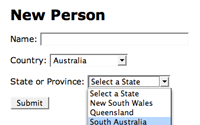
See how to dynamically change a select menu based on another select menu using Javascript. In this episode everything is kept client side which leads to a more responsive user interface.
There is a newer version of this episode, see the revised episode.
javascripts_controller.rb
def dynamic_states
  @states = State.find(:all)
end
application_helper.rb
def javascript(*files)
  content_for(:head) { javascript_include_tag(*files) }
end

def stylesheet(*files)
  content_for(:head) { stylesheet_link_tag(*files) }
end
people/new.html.erb
<% javascript 'dynamic_states' %>
...
<p>
  <label for="person_country_id">Country:</label>
  <%= f.collection_select :country_id, Country.find(:all), :id, :name, :prompt => "Select a Country" %>
</p>
<p id="state_field">
  <label for="person_state_id">State or Province:</label>
  <%= f.collection_select :state_id, State.find(:all), :id, :name, :prompt => "Select a State" %>
</p>
javascripts/dynamic_states.js.erb
var states = new Array();
<% for state in @states -%>
  states.push(new Array(<%= state.country_id %>, '<%=h state.name %>', <%= state.id %>));
<% end -%>

function countrySelected() {
  country_id = $('person_country_id').getValue();
  options = $('person_state_id').options;
  options.length = 1;
  states.each(function(state) {
    if (state[0] == country_id) {
      options[options.length] = new Option(state[1], state[2]);
    }
  });
  if (options.length == 1) {
    $('state_field').hide();
  } else {
    $('state_field').show();
  }
}

document.observe('dom:loaded', function() {
  countrySelected();
  $('person_country_id').observe('change', countrySelected);
});
Note
I changed the above javascript slightly to call the countrySelected() function upon dom:loaded instead of hiding the states menu. This way if a country is already selected the states will reflect this.
