
#38
May 30, 2007

Multibutton Form

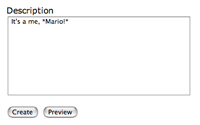
If you have a form with multiple buttons, you can detect which button was clicked by checking the passed parameters. Learn how in this episode.
Download (15.1 MB, 4:26)
alternative download for iPod & Apple TV (7.2 MB, 4:26)
<!-- projects/new.rhtml -->
<% if params[:preview_button] %>
  <%= textilize @project.description %>
<% end %>
...
<%= submit_tag 'Create' %>
<%= submit_tag 'Preview', :name => 'preview_button' %>
# projects_controller.rb
def create
  @project = Project.new(params[:project])
  if params[:preview_button] || !@project.save
    render :action => 'new'
  else
    flash[:notice] = "Successfully created project."
    redirect_to project_path(@project)
  end
end

RSS Feed for Episode Comments 9 comments

1. weskycn May 30, 2007 at 03:39

很好,
我很喜欢看你的例子!!


2. pimpmaster May 30, 2007 at 03:48

This is too funny. I was halfway through a post on railsforum asking how to do exactly this when my RSS alerted me to a new Railscast. Your timing could not be better!

d:)


3. vigosan May 30, 2007 at 06:04

I'm agree with the first comentary ;)


4. Geoff Buesing May 30, 2007 at 09:06

Clever stuff!


5. Alex G May 30, 2007 at 13:49

well done!


6. Zubin May 30, 2007 at 19:13

One way round the AJAX form problem is to have one submit button, and use a "preview" checkbox.


7. Gavin Sim May 31, 2007 at 08:57

Another great railscast! please keep them coming!


8. weskycn Jun 01, 2007 at 18:39

how to use submit_to_remote?
will you give me a example,
i test it 10 hours ,but ,i cannt .
hehe!


9. flyerhzm Feb 24, 2008 at 21:49

I found the multibutton form can be work only for form_for, but not for form_remote_for

Add your comment:

(SKIP THIS ONE)

(required)

(not shown)


(use pastie or gist for code)

sponsored by:
if you want to help:
required:
Get Quicktime Player