
Thank you! This really what i'm looking for!
I appreciate your greak work! Thanks again!
Great tips.
Uhm .. how did you get that command line "ri" documentation to work? The command exists on my system but it looks like the actual docs are missing, eg:
$ ri Time.strftime
Nothing known about Time.strftime
Is there any way to put the format string things in the file other than environment.rb?
Thanks for the great screencasts.
I'm big fan :)
Hi, thanks for the hint with Time::DATE_FORMATS, I've been looking for quite a while for something like this :)
You can push this even further be adding a alias_method for to_s in Time class like this:
class Time
alias_method :[], :to_s
end
Now you can do something like Time.now[:custom_format] etc.
There is no []-instance method for the time-class, so this does not destroy some other behaviour in your existing app.
Greetings, Christoph
I appreciate your greak work!
These little tricks are always the best.
Thanks for the great screencasts.
@Rebort, hmm, how did you install Ruby? Did you compile it from the source? If so, you needed to do "make install-doc" command after "make install".
@eskim, yep, you can move this into a file in the "lib" directory. Then just "require" the file in your environment.rb.
Thanks Ryan, another great screencast!
If anyone's wondering, %e = Day of the month with no leading zeros (0-31). This is missing in "ri strftime" for both Time and Date ("ri Date.strftime" returned no info for me).
Does anyone know how to add a more generic string formatting function to the environment file (or elsewhere), which is available to models, controllers and views? (eg str_to_webname?)
@Zubin, cool, didn't know about %e.
Regarding your question, you could extend the String class to add your own method which does this. Place this in a file in your lib directory and require it in environment.rb
--
class String
def to_webname
#...
end
end
--
sorry there's no indentations
absolutely useful tip... even now that I know it, I still can't find the documentation for Time class... so imagine if I didn't know...
Nifty piece of advice and I have already implemented it in my project however it seems to cause my functional tests to fail. Is there anything extra/special that needs to be done in other for it to work in my tests. I keep getting a 'wrong number of parameters' error for to_s.
@schlick, make sure each of your fixtures has the time column specified in it. It sounds like the time is returning "nil" which will result in the error you are receiving. If you still can't get it to work I recommend you post on railsforum.com about this.
Thanks Ryan for the quick reply. And yes, you were right. I needed to add in values for my datetimes into my fixtures.
very cool~
Add This:
ActiveSupport::CoreExtensions::Time::Conversions::DATE_FORMATS.update(:my_format => '%y-%m-%d %H:%M')
For Rails 2.0 you need to do like this in your config:
ActiveSupport::CoreExtensions::Date::Conversions::DATE_FORMATS[:due_on] = '%m-%d-%y'
:)
With rails 2.0.2 and after adding ActiveSupport::CoreExtensions::Time::Conversions::DATE_FORMATS[:rfc3339] = '%Y-%m-%dT%H:%M:00.000Z' to environment.rb I get a "rake aborted! uninitialized constant ActiveSupport" each time I run rake db:migrate. I am unable to find why... someone can help?
GregH, akatako,
Try adding those after the
Rails::Initializer.run do |config|
..
end
ActiveSupport::CoreExtensions::Time::Conversions::DATE_FORMATS.merge!(
...
)
Hope that helps.
I had a similar issue with ActionMailer as well.
For Rails 2.2:
# config/initializers/time_formats.rb
Time::DATE_FORMATS[:my_format] = "%B %Y"
Great site, thanks for the hard work!
Just a typo probably, but for the record and to encourage proper English usage:
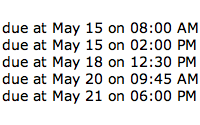
The screen picture above shows the right prepositions (on %B %d at %I %M %p) but the video shows them reversed (at %B %d on %I %M %p).
Blogs are good for every one where we get lots of information for any topics. Nice job , keep it up !!!
I have checked your site and I invite others please check it because the information that is available in your site can spell bound any one.and the images that you have shown in this site also very attractive. There is one more site that I have visited, provide me information that is really unique and the service that they offer also I have experienced, really I enjoy this sevice so I request others please visite this and I want to tell you that after enjoying this service you’ll enjoy it again and again its .
Thank you for sharing.Nice post!!! hese little tricks are always the best. Thanks for the great screencasts.
It's the difference between a quick format and a full format. The quick format just "zeroes" the volume table whether it's FAT of NTFS. A full format zeroes the data on the drive as well and consequently takes a lot longer.
Using the INT( ) function will strip away the decimal value, leaving only the Integer or whole number. Then you can compare the two values from those functions.
Thanks for sharing your article. I really enjoyed it. I put a link to my site to here so other people can read it. My readers have about the same interets
still can't find the documentation for Time class... so imagine if I didn't know...
Good article! Thank you so much for sharing this post.Your views truly open my mind.


