
Thanks for this, very interesting and always useful
Estupendo, That was exactly what I needed for my project.Thank you Ryan
Thanks for the episode.
Something that might be of interest is my cron DSL http://github.com/adzap/cronos
Its only the DSL, it doesn't actually handle the cron job management but is designed to be used in plugins/gems like whenever, craken and crontab to use a very natural syntax for defining the intervals. You can also use it in irb for cron sanity checks.
Thank you so much for all your excellent screencasts, Ryan.
I'm an 18 year old college student suddenly getting interested in RoR and find each of your tutorials very well drawn out and ridiculously clearly explained.
I appreciate your work, thanks again!
Great plugin, I only started using this a couple of days ago so am surprised to see a screencast on it :)
The only problem is on the server I was using this syntax gave an invalid cronjob:
every :saturday, :at => "4:38am"
@Joshua feel free to create an issue on github if you're having trouble. You can view your whenever generated cron jobs without actually updating your crontab by running `whenever` from the command line.
We use a nigthly rake task that then runs everything that needs to be done, which keeps all code in ruby and nobody has to even touch the crontab
http://pragmatig.wordpress.com/2008/12/14/no-more-crontab-madness-with-a-single-night-rake-task/
another great background-task gem is http://rufus.rubyforge.org/rufus-scheduler/
i use it to run a rake task every 15 minutes, but without cron, so it works on my windows developer machine as well
Wow! This is GREAT!
Thanks for the screencast, this is a VERY useful gem!
So no one has really answered Piotr. Does this only work on Unix machines? davide's comment seems to suggest so.
@Piotr, AFAIK windows doesn't have cron so I'm assuming this will not work there.
However, the cron job should only be generated on your production machine. So if you are using Windows in development and Unix in production, then yes, you can use this.
crontab only works on unix machines, therefore whenever will only work on unix machines
Nice, a couple months ago I tried to find a cron solution with rails and it was really frustrating. Tried backgroundrb and a few other things to no avail. I plan on trying this asap!
Great plugin! Just wish I'd known about this a couple weeks ago when I needed it :)
Awesome, awesome, awesome!
Ryan, you read my mind. I have been using launchd on my OSX server, but it was a bear to setup, and I was just looking into cron in anticipation of moving to an Ubuntu server. This makes my life so much easier.
Thanks :) And kudos to Javan for a fabulous gem.
Does anyone have any suggestions on how to test this on a local machine first before putting it on a server? I'm having trouble figuring out how to do that. Thanks!
How do you handle the case where things should only happen once, but if you have multiple webservers, every webserver will run the same cron action.
Eg: Cart.remove_abandoned
You probably only want this to be call once only, but if deployed on N number of webserver environment it will run N times?
Thanks!
How does this compare to backgroundrb? It seems cleaner & will probably use less memory... but are their any down sides to this approach? Do I loose any features?
@Lourdes You can view the cron output without actually updating your crontab by running `whenever` with no options locally (or on your server).
@Francis That's where the :roles => :db comes into play in the included capistrano task. By default the cron jobs get deployed to the db server, but you could customize this however you like, and could conceivably deploy different cron jobs to servers with different roles.
@Melvin Ram The nice thing about cron is you don't have to worry about a process dying.
Ryan, you stated that the cron should only be generated on the production server, but what if you have a test or qa environment. You would want it setup there, but the generated cron entries have "RAILS_ENV=production". Is there a way to set that?
@Bill A new version of the Whenever gem was just published that allows you to override variables on the fly. So when deploying to qa server you might do something like:
whenever --update-crontab my_app --set environment=qa
@javan/ryanb,
I wrote a simple runner task in scheduler.rb. When I entered 'whenever' in Terminal to see the cron jobs, I got the following error..
rubygems.rb:147:in `activate': can't activate activesupport (= 2.1.0, runtime), already activated activesupport-2.2.2 (Gem::Exception)
I was using daemons before this to perform some tasks relating to my app models. i could specify activesupport version to use in daemons. How can i do this here?
@Vinay there's an open issue on github for this exact problem. I haven't had a chance to fix it, but the easy solution is to just uninstall one of your activesupport gem versions.
Compared to many syntaxes, cron's is very predictable and comprehensible. It's no crazier than regular expressions and anyone who understands it has my respect.
In defense of cron, I'd say it keeps your system tasks in one central location rather distributed among separate applications.
This is perfect, just what I need in the App I'm currently developing!
Very cool tool, except I can't get it to work and I can't find any support forums for it either.
When I try to run the whenever command on my production box I get the following error, any ideas?
can't activate activesupport (= 2.2.2, runtime), already activated activesupport-2.3.2
Hey,
I've got a little detail question: what theme do you use for Textmate? Because I realy like yours, but just can't find it on the web.
Thanks,
Nico
@Ruslan The */2 style syntax is less compatible across unix systems, but thanks for sharing.
What about rails applications that are written in version 1.2.6? What gem do you suggest? Because javan-whenever supports only rails >= 2.1
Giving some love to craken as well:
http://github.com/latimes/craken/tree/master
The big problem with the cron/rake pattern is that it loads the environment every time it needs to run a task.
The scheduler_daemon plugin is a much cleaner solution.
Check it out: http://github.com/ssoroka/scheduler_daemon
Thanks Ryan for this new screencast ! :)
@Nico: for the TextMate theme used, check http://railscasts.com/about > "TextMate Theme" section. ;)
@Piotr Nowak: AFAIK there is no such thing as cron in Windows, so nope - it works only on various Unixes: Linux, *BSD and so on...
Ryan-
I've now watched this and your cast on the daemon gem and I'm confused on what you feel to be the best practice.
Let's say you need to set something up to basically continually poll your database to see if their are any new emails to deliver, or whatever. Would you use a cron job or would you use a daemon? Would you actually run it from the job or would you hand it off to something like BJ to run so the scheduler can continue? What if you have a variety of things that need to be checked, like checking for new mail from a server every 10 minutes, sending alerts every 2 minutes, pulling data from a web service every 5 minutes, etc.
I can't seem to find anything that addresses the best practice for something like this in rails.
Hi Ryan,
Thank you very much for these great screencasts!
Can you suggest something on the reserved words in rails? I know that this post is not relevant here, but i did not know where to. Am developing an application and already i find that i cannot use many of the words (eg: module, type, etc)
Thanks!
Thanks Ryan!
Your screen cast is the best! I always find very useful tips from your casts.
Great video as always.
I'm having trouble getting the crontab to write the crontab with a Capistrano deploy to EC2. While it's deploying it tells me that the crontab has been written, but when I log in and run crontab -it's still the old crontab (previous Capistrano release). I have to then manually run whenever --write-crontab. And then running crontab -l shows the correct release.
Does anybody have any ideas on what could be causing this? I have tried a million variations and nothing seems to be working.
This is great! I've, up until now never really had the need to use repeating background processes, however, I was, just for fun, looking to see if anything existed for when I really needed it. (which I do with a lot of Rails stuff!). Sadly, I was unable to find anything for months, and then this screencast comes out. With a gem that allows you to write "Ruby" syntax to create "cronjobs"? Excellent! Being able to do that kind of important processing with such an easy syntax is extremely useful and saves a load of time, not to mention that it saves a lot of hassle for every deployment and/or server transfer. Also the fact that the server triggers it every time means that it's actually very light-weight compared to (which I never got working properly), other daemon-like gems!
Thanks Javan! I'll be watching you on Github! :)
Great! This is the kind of gem i was looking for 2-3 months ago. With this gem I can now configure crontab using capistrano script. Thanks!
I had a small issue when indexing from the cron job, it wouldn't reindex new records, but it worked fine when manually running the command that was in the cron file.
The solution was to add the location of the sphinx binaries to sphinx.yml (this only applies to passenger apps) http://freelancing-god.github.com/ts/en/common_issues.html.
Hope I save someone a couple of hours :)
Although Windows does not have Cron one might have some luck using Vixie cron which can be installed in Cygwin. I have had partial success using Vixie cron on a Windows system thought it wasn't a breeze.
http://www.cygwin.com/
Great video as always.
I'm having trouble getting the crontab to write the crontab with a Capistrano deploy to EC2. While it's deploying it tells me that the crontab has been written, but when I log in and run crontab -it's still the old crontab (previous Capistrano release). I have to then manually run whenever --write-crontab. And then running crontab -l shows the correct release.
Does anybody have any ideas on what could be causing this? I have tried a million variations and nothing seems to be working.
Is this better than using a daemon, or just an alternative? And does this create a crontab conflict if you have several apps using the same gem?
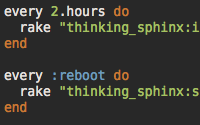
If you find that your scheduled thinking sphinx task is running but your index isn't updating then you probably need to add PATH and possibly SHELL variables to the top of your crontab file because cron doesn't load your users ennvironment.
Cron is not so hard to understand, but with such plug-in it became easier to use!
Using the "runner" option can only run rake tasks or methods inside of models? It can't run a method inside of a controller?
I've been using this for a while and it's great. Timezone support would make it fantastic!
Hi there.
I'm using nifty-config and the whenever gem. But the values set in app_config.yml are not recognized when running the "whenever --update-crontab" command.
How do I fix this? Any suggestions?
hi everyone,
I have a question about cron in ruby. At the same time rails can running multi threads( requests). Example:
30 * * * * rake RAILS_ENV=production schedule:reload_30minutes
5 * * * * rake RAILS_ENV=production schedule:reload_5minutes
How do it?
(thanks)
Hi,
I noticed in the source line that you were using the gems.github.com and on their wiki at github their using gemcutter. Which one should I use? Is gemcutter the most recent?
Thanks
I like wheneverize. Problem I bumped into today. It allows only one crontab per user. So if you have 2 apps running they need to be with different user accouns otherwise wheneverize deletes the crontab settings from the other running app?! This seems unnecessary. Maybe the rails app name could be used to differentiate the 2 crontab lists? Does backgroundrb allow for several crons running on same user?
(Might save me some time looking for another suited plugin...)


