
#116
Jun 30, 2008

Selenium

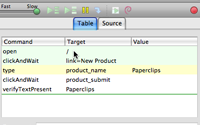
Selenium is a great way to test your app automatically through a browser. See how it works in this episode.
Tags: tools testing
Download (15.9 MB, 9:30)
alternative download for iPod & Apple TV (11.8 MB, 9:30)

Resources

script/plugin install git://github.com/ryanb/selenium-on-rails.git
script/generate selenium destroy_product.rsel
rake test:acceptance
# test/selenium/destroy_product.rsel
setup :fixtures => :all
product = Product.first
open '/'
click "css=#product_#{product.id} a:contains('Destroy')"
assert_confirmation('*')
wait_for_element_present "css=#flash_notice"
assert_element_not_present "css=#product_#{product.id}"
refresh
assert_element_not_present "css=#product_#{product.id}"
# config/selenium.yml
environments:
  - test

browsers:
  firefox: '/Applications/Firefox.app/Contents/MacOS/firefox-bin'
  safari: '/Applications/Safari.app/Contents/MacOS/Safari'

Full Source Code

RSS Feed for Episode Comments 24 comments

1. QuBiT Jun 30, 2008 at 00:21

Just AMAZING!

if you know java and junit inside eclipse or other testing environments from other languages you really know how useful such and IDE can be.

Selenium is really really cool.

THX Ryan for that screencast.


2. Clemens Kofler Jun 30, 2008 at 00:43

FINALLY! I've been waiting for ages to have a good screencast on Selenium. Can't wait to see this.

Cheers, Ryan!


3. Otero Jun 30, 2008 at 01:26

Nice! Running from a rake task it's very usefull!

Must try this!


4. Bryce Jun 30, 2008 at 08:14

Thanks a lot Ryan for this intro to Selenium! What a great tool to compliment the current test suite and enhance UI testing.

Do you think this will eventually replace the built in rails test suite? Will it work with autotest?

Thanks again for the great screencasts
Bryce


5. Brandon Jun 30, 2008 at 09:15

Hopefully we will see your forked changes incorporated back in to the plugin. Thanks for your work on this.


6. Ryan Bates Jun 30, 2008 at 10:06

@Bryce, Selenium is great, but I don't think it will ever replace unit or functional tests. It works very well for testing the flow between multiple pages, javascript, and making sure the full stack of your app works. I would not use it for testing complicated business logic or numerous edge cases.

AFAIK, out of the box this doesn't work with autotest, but I'm sure it's possible to hack that functionality together somehow. I haven't tried.

I personally wouldn't find autotest support very useful. To me acceptance tests are something that don't have to be run as often as unit or functional tests. However I'm still trying to figure out how best to fit Selenium into my workflow.


7. Quincy Jun 30, 2008 at 23:02

I can't install git on my laptop. It's an old Lombard with Panther 10.3. I downloaded the selenium-on-rails package from the github website, but I'm not sure how to install it. It includes one very long filename. Can anyone show me how to install it?


8. Yuchen Jul 01, 2008 at 11:56

It is indeed useful to test the flow, from functionality perspective. But most of the time we have problem with different browsers that the visual presentation of web pages differ a lot. Say it looks most of the time OK in FF, but just bad in IE. And the javascript is not surely to work on different browsers either. Can Selenium help on those issues?


9. Ryan Bates Jul 01, 2008 at 17:00

@Quincy you likely downloaded the ".tar" file. You'll need to uncompress this. Once you do you'll end up with a folder with the plugin inside. Rename the folder to 'selenium-on-rails' and move it into your vendor/plugins directory and you should be good to go.

@Yuchen testing the visual look of the page would be hard to do programatically with any tool. You may want to try scripting Selenium to take a screenshot when going to certain pages. Then you can quickly review all of these. I haven't looked into this so I'm not sure how difficult/possible it is.

As for testing Javascript, Selenium can certainly do this (as I show in the episode) and I find it to be one of the big reasons to use it.


10. jamir Jul 02, 2008 at 01:39

good one! thanks a lot>


11. t3i Jul 03, 2008 at 02:31

Very Cool.

Nice changes to the 2.1 git version.

I've watched almost all of your casts and look forward to them every week.

Thank you very much
Ben

PS i love the new intro sound, ;-)


12. Maxim Shevertalov Jul 03, 2008 at 06:10

Great screencast. I've been using Selinium for about a year now, good product and getting better all the time. About 2 weeks ago I posted a small description of how I'm testing www.graphsy.com with selenium. If anyone is interested you can check it out at:
http://www.blog.graphsy.com/?p=18
In that post I try to show how mouse events can be simulated and tested for in selenium.

Thanks for a great screencast, more people need to know about selenium.


13. Brad Jul 03, 2008 at 09:40

Another great screen cast. Keep up the nice work!


14. tesst Jul 05, 2008 at 10:09

test


15. James King Jul 05, 2008 at 14:54

Thank you Ryan!

I would be interested if anyone has any thoughts of how and when to integrate Selenium alongside a BDD workflow, especially when using Rspec and Rails.

I've been preparing to write some Rspec user stories for my app, but my first impressions of Selenium are making me think again. Selenium seems to be much quicker, more intuitive and more comprehensive by including the browser into the equation.

The only thing that's holding me back from jumping headfirst into Selenium right this minute is the fact that its geared up for testing rather than specing and I'm rather keen on the BDD conventions.


16. Maxim Shevertalov Jul 06, 2008 at 07:56

James, I think you can kind of do BDD testing with selenium, as long as you first prototype what your front end looks like. If you make the views you want to use, or at least stay consistent with you ID values of ways of referencing fields you can write selenium cases for them before actually implementing anything. Though, then you will need to write everything by hand and the Selenium IDE will not be as useful. My development process tends to be just that, first prototype the front end, then make selenium cases for it, and then hook it up to the back end. Hope that helps.


17. NO Jul 07, 2008 at 02:43

Hi

I found I always get false on assertTextPresent (assert_text_present) and verifyTextPresent (verify_text_present) with selenium_on_rails while the same test passes with Selenium-IDE.

Do you have any ideas ?

I'm trying on both the original selenium_on_rails with rails-2.0.2 and your git version with rails-2.1. But the results are same...

Anyway, this episode is great.
Thank you very much.


18. Hey Jul 07, 2008 at 08:53

Hey

/rorApp/application/vendor/rails/activesupport/lib/active_support/dependencies.rb:115:in `qualified_const_defined?': "Plugins::Selenium-on-rails::Lib" is not a valid constant name! (NameError)

Any ideas? Rails 2.1 with ryanb modified selenium plugin.


19. Hey Jul 07, 2008 at 11:58

Renamed /plugins/selenium-on-rails to selenium_on_rails and all ok :).


20. James King Jul 08, 2008 at 08:30

Maxim, Thanks for your thoughts.

Since my comment, above, I have found quite a few people who are working with both Rspec and Selenium. I did try to post a comment with links to relevant pages, but Akismet thought it was spam. If anyone is interested in working with both these tools and integrating Selenium into a BDD workflow, then just google "Rspec and Selenium" and some interesting projects come up.


21. bkola Jul 12, 2008 at 06:52

woohoo!


22. rich Jul 13, 2008 at 16:49

Have you tried Watir? I've been using that for a while now. The API is much better than Selenium. I know that Brett P. is working hard on getting Firefox(Firewatir) compatible with IE Watir Scripts.


23. Pete Jul 31, 2008 at 01:23

Hey thanks for the video Ryan. Awesome little tutorial. I had previously installed Selenium inside my Rails projects by following the writeup here:

http://siannopollo.blogspot.com/2007/02/selenium-and-ruby-they-actually-work.html

Works very well, but not quite as flexible and versatile as this method. Thanks


24. Yury Kotlyarov Aug 08, 2008 at 00:59

Hi!

Thanks for great screencast!

Any ideas how to use it to test app which serves different subdomains eg using account_location plugin?

--Yury

Add your comment:

(SKIP THIS ONE)

(required)

(not shown)


(use pastie or gist for code)

sponsored by:
if you want to help:
required:
Get Quicktime Player