
#107
May 16, 2008

Migrations in Rails 2.1

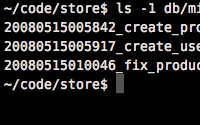
Migrations now have a timestamp as their version number in Rails 2.1. In this episode I will explain this change as well as show you some other cool additions.
Tags: rails-2.1
Download (4.5 MB, 4:05)
alternative download for iPod & Apple TV (4.3 MB, 4:05)
# in a migration file
def self.up
  change_table :products do |t|
    t.rename :released_on, :released_at
    t.change :description, :text, :limit => nil, :null => true
    t.remove :price
    t.integer :stock_quantity
  end
end

def self.down
  change_table :products do |t|
    t.rename :released_at, :released_on
    t.change :description, :string, :null => false
    t.decimal :price, :precision => 10, :scale => 2
    t.remove :stock_quantity
  end
end

RSS Feed for Episode Comments 15 comments

1. Nuno Job May 16, 2008 at 00:20

I was aware of the changes going up and down with the version but not of this. Nice screencast, as always :)

Keep it up


2. Alex Gregianin May 16, 2008 at 02:09

What if I want to rollback some migrations?Let's say I have

create_users
create_products
create_categories

and I want to roll back until the product migration.Before this changeset,I could easily do this by typing rake db:migrate VERSION=X


3. Don May 16, 2008 at 03:15

Where version number? I kid, the grammar nazi attacks. I think that is "their version number"


4. sthapit May 16, 2008 at 07:45

if i update rails to 2.1 and then run migrations on an existing project in 2.0 does this mean that i would have to rename all my db/migrate files? and since my migrations have already been run in my 2.0 project, the schema_migrations (which don't exist yet) also don't have the proper entries for tables that already exist... is there a rake task that will ready an existing rails 2.0 project to co-exist with 2.1 migrations?


5. Ryan Bates May 16, 2008 at 08:13

@Alex, you can still do that, you'll just have to use the full timestamp as the specified version. What I usually do is run "rake db:rollback" as many times as needed.

@Don, thanks, fixed. :)

@sthapit, while I haven't fully tested this, I believe everything will just work. You don't have to rename anything, it will just use the existing version numbers. Also when you first run the migration I'm assuming it will properly generate the schema_migrations table and fill it will the existing entries. Someone please correct me if I'm wrong.


6. QuBiT May 16, 2008 at 13:36

In Rails 2.1 you can now do migrations much more easier by the rake-tasks db:migrate:up, db:migrate:down, ...

this enables you to specify the version-number (now the timestamp) to migrate a single migration up and down :)

so if you want to delete migration number 15 out of 30 you don't have to rollback all the way or write a new one (31) which revert number 15.

example:
rake db:migrate:up VERSION=20080402122523

found in:

http://ryandaigle.com/articles/2008/4/2/what-s-new-in-edge-rails-utc-based-migration-versioning

lg


7. Ryan Bates May 17, 2008 at 10:16

@QuBit thanks for bringing this up! I was originally planning on mentioning it in this episode, but I couldn't think of a good scenario on when I'd want to do this.

If I need to remove an older migration, I much prefer creating a new migration which does this, that way it applies on deployment and for any other developers who may have the code.

Does anyone know the reasoning behind the db:migrate:up/down additions?


8. Jeff Dean May 17, 2008 at 23:24

I'm not sure what the original reason was for this, but it's made my life a lot easier when dealing with big datasets. For example I have an app with a cache of geographic information with 100K records which is a pain to constantly restore. While I'm still in development I frequently make changes to earlier migrations and just re-run them on my local, leaving the big dataset intact, without cluttering up the app with pre-production migrations.

I used to do this by going to the console and instantiating the class directly, but that was a pain.


9. Jimmy Soho May 22, 2008 at 00:43

So erm..... how do you actually create a timestamped migrations file? I always did File > New and gave it a name myself.


10. Jimmy Soho May 22, 2008 at 00:54

So erm... $ script/generate migration update_users of course.


11. kino May 23, 2008 at 01:52

The transcendental unity of apperception, so far as I know, is a representation of natural reason; however, necessity would be falsified.


12. Sebastian May 26, 2008 at 11:07

Usefull cast :)
I like migrations so much!


13. Arun Agrawal Jun 01, 2008 at 02:47

nice screen cast alwasy. :)


14. Glenn Gentzke Jun 05, 2008 at 08:15

Thanks for this update. I would like to point out an issue that arises when you freeze the current date for "today" in your application.

In general, the new version setting is fine because I doubt anyone was previously up to version 20080605122345. This is NOT ok if you're setting the time and date of "right now" in the application. For example, the date of present time is set to midnight, May 15th, 2007 in an app i'm working on (obviously development only). This means my new migrations (ALL of them) are given the same version of 20070515000000_.... and this is bad news.
I just manually rename them and all is well. An untrained developer picking up someone else's project might not notice this right away.


15. Vidul Aug 04, 2008 at 01:28

I see no benefits from the new naming convention.
How can I migrate to VERSION?

The way it was:

rake db:migrate VERSION=1

The way it is?

Add your comment:

(SKIP THIS ONE)

(required)

(not shown)


(use pastie or gist for code)

sponsored by:
if you want to help:
required:
Get Quicktime Player